Every Linux machine you own. One dashboard.
One self-hosted dashboard for every Linux machine you own, across every cloud you rent from. Power control from the provider API, and a button layer over the commands you keep re-typing through SSH.
- Nothing is installed on your machines
- No credential leaves your box
$ go install github.com/mohitsolanki026/cloudroof/cmd/cloudroof@latest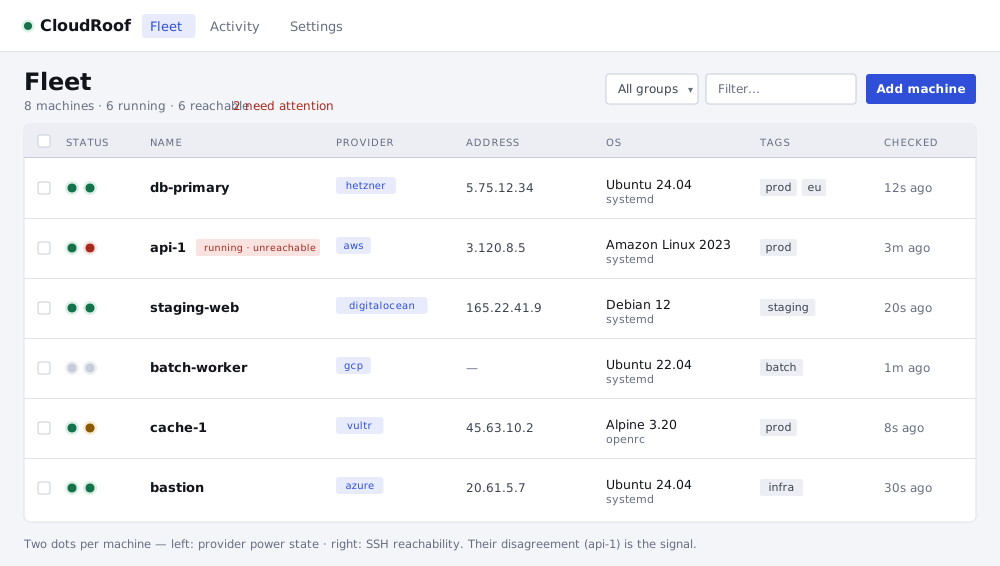
The whole fleet in one view. Interface previews, faithful to the actual UI.
Product tour
From one machine to the whole fleet.
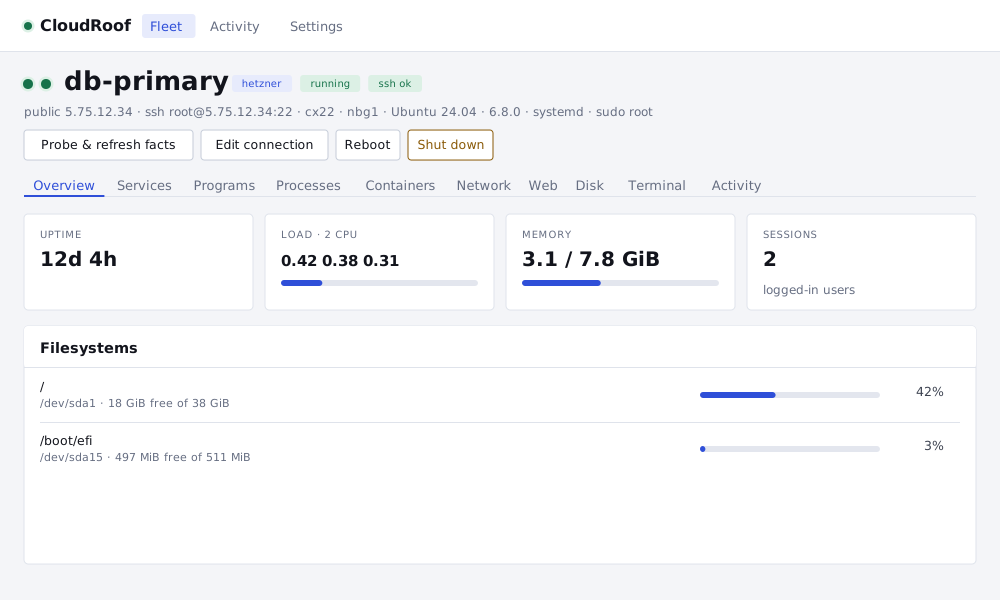
A single machine's operations surface: a live overview, with tabs for services, containers, network, disk, and a real terminal.


The signal
Two dots per machine. Their disagreement is the signal.
The left dot is what the cloud says: running or stopped. The right dot is what SSH saw: reachable, refused, timed out, or auth failed. Reachability refreshes on its own, so the dots stay honest.
What it does
Everything you keep SSHing in to do.
Tabs are drawn from what each host actually has: a box without Docker never shows a Containers tab, and one without systemd never shows Services.
Fleet view
Every machine across every provider in one list, with two status dots: what the cloud says and what SSH saw.
Power
Start, shut down, reboot, force-stop, force-reboot via the provider API. For when SSH is dead.
Overview
Uptime, load, memory, filesystems, sessions, reboot-required. One batched probe per refresh.
Services
systemd units with start, stop and restart, a journal snapshot, and a live journalctl -f follow.
Programs
Supervisor programs with start, stop and restart, and a live tail -f.
Processes
Top by CPU, with TERM and KILL.
Containers
Docker containers with start, stop and restart, live docker logs -f, disk usage, and prune.
Network
Listening ports and established connections mapped to the owning process, plus a reach-a-URL probe run from the host.
Web
nginx config test and gated reload, and a TLS certificate expiry check for any host:port.
Disk
Largest directories, inode usage, journal vacuum, apt cache clean.
Terminal
A real shell on the pooled SSH connection.
Activity
Every command CloudRoof has ever run, with output, append-only.
Fleet operations
Act on one machine, or on all of them.
Groups
A named set of tags. A machine belongs when it carries all of them, resolved live so membership tracks the fleet as tags change.
Bulk actions
Select machines or a group and run one action across all of them. A read needs a click. A write makes you type the number of affected hosts, after a preview that names them. Each host is gated, sudo-decided and audited individually, and you get a per-host result.
Custom actions
Save your own command as a button, with named params (shell-quoted), a declared danger tier the gate enforces, and optional capability requirements. Destructive one-offs belong in the terminal.
Providers
Six clouds. Read and power permissions only.
Each provider needs only read and power permissions, and the account form tells you exactly which. The form is generated from each provider’s spec, so adding a provider needs no UI work.
An API token.
An API token.
An access key pair. Scans the regions you name, or all of them.
A service principal: subscription, tenant, client id and secret.
A service-account JSON key. Scans the projects you name, or the key’s own project.
An API key.
Not on a supported provider?
Bare metal, a Pi, a provider we don’t speak yet: add it by SSH and you get everything except power control.
Slim builds
All six providers make a ~59 MB binary. Hetzner, DigitalOcean and Vultr are plain REST clients, so a build with just those is ~16 MB. Run make slim.
Safety
Every action carries a tier.
Runs on click
Reads and other harmless actions. One click, done.
Asks once
A single confirmation before it runs.
Type the machine’s name
You have to type the name of the machine to proceed.
Does not exist as a button
rm -rf, mkfs, terminate. Not available as a button, and never will be.
You always see the command
Every button shows the exact command before it runs and logs it after. The Activity tab keeps every command CloudRoof has ever run, with output, append-only.
Nothing hangs on a prompt
Actions that need root use passwordless sudo -n where the host allows it, and are disabled, never left waiting, where it doesn’t.
Private by default. Exposed only when you say so.
CloudRoof binds to 127.0.0.1:7070 by default, refuses requests whose Host header is not itself (DNS rebinding), and refuses cross-origin browser requests (CSRF). Before exposing it beyond a trusted network, put it behind a reverse proxy that adds authentication and TLS. Multi-user auth is on the roadmap.
# opt in, and name the hosts you will use
cloudroof -addr 0.0.0.0:7070 -hosts cloudroof.lan,10.0.0.5

# or with Docker
docker run -d -p 7070:7070 \
  -e CLOUDROOF_HOSTS=cloudroof.lan \
  -v cloudroof:/data \
  ghcr.io/mohitsolanki026/cloudroof
Install
One command. Then open localhost:7070.
Installs the full binary with the web UI bundled. Prebuilt binaries are also attached to each release.
With Go
go install github.com/mohitsolanki026/cloudroof/cmd/cloudroof@latest
~/go/bin/cloudroof

# to launch it as just `cloudroof`
export PATH="$PATH:$(go env GOPATH)/bin"
From source
git clone https://github.com/mohitsolanki026/cloudroof
cd cloudroof && make web && make build && ./bin/cloudroof

# smaller build, drops AWS + Azure + GCP
make slimStatus
v1.5, and honest about what’s next.
Six providers. The systemd, supervisor, docker and nginx catalog. Live log streaming. Self-refreshing reachability. Tag-based groups, bulk actions and saved custom actions. A single admin user. One-command install.
Metrics history. Multi-user auth. Neither is in v1.5, and the page won’t pretend otherwise.